
ChatGPT
ChatGPT
🤖 ChatGPT User Guide & Tips (2025 Edition)
A comprehensive manual to help you master ChatGPT, covering the basics, interface navigation, and advanced prompt engineering.
🚀 Part 1: Quick Start
1. Sign Up & Login
- Website: chatgpt.com
- Account: It is recommended to use a Google, Microsoft, or Apple account for quick login.
- App: For mobile users, ensure you download the official app developed by "OpenAI".
2. Interface Overview
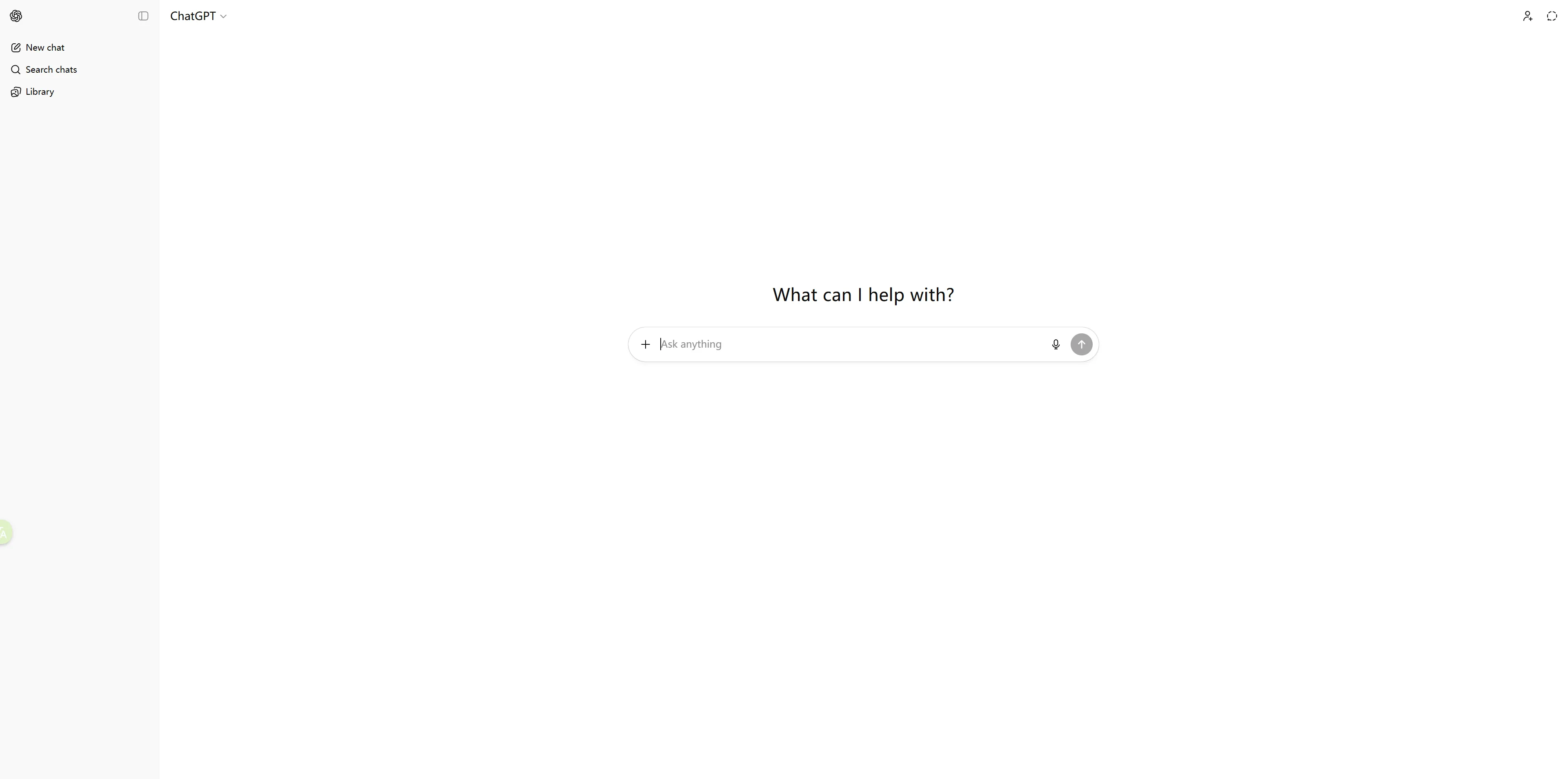
- Left Sidebar (History):
- Your "Memory Bank." All past conversations are saved here.
- Click
New Chatat the top left to start fresh.
- Center Window (Chat):
- This is where the conversation happens.
- Bottom Input Bar:
- 📎 (Paperclip): Upload files (Excel, PDF, Images, etc.).
- ⬆ (Arrow): Send button (or simply press
Enter). - 🎧 (Headphones): (Mobile only) Start a real-time voice conversation.
💡 Part 2: Core Features & Troubleshooting
1. What if the response stops mid-sentence?
If the generated content is very long (like code or a long essay), AI might pause.
- Solution: Click the "Continue generating" button that appears above the input bar.
2. What if I'm not satisfied with the answer?
Don't just copy-paste the question again. Try these:
- 🖊️ (Edit): Hover over your original question, click the pencil icon, refine your wording, and submit again.
- 🔄 (Regenerate): Click the refresh icon at the bottom of the AI's response to get a completely different version.
3. File Analysis (GPT-4o Feature)
- Excel Analysis: Upload a sales spreadsheet and ask: "Analyze the trends and visualize the data with a bar chart."
- PDF Summary: Upload a 50-page report and ask: "Summarize the key takeaways in simple language."
- Image Recognition: Upload a photo of ingredients in your fridge and ask: "What recipes can I cook with these?"
🎓 Part 3: Prompt Engineering (The Golden Rules)
Context + Role + Format
❌ The Rookie Way
"Write a weekly report for me." (The AI doesn't know what you did, so the result will be generic and useless.)
✅ The Pro Way (Copy This)
"[Context] This week, I finished the homepage redesign, and user click-through rates increased by 15%, but we faced some server latency issues. [Role] Act as a Senior Product Manager. [Format] Write a concise weekly report including 'Key Achievements', 'Data Highlights', and 'Issues & Solutions'. Use Markdown bullet points."
🛠️ Part 4: Personalization (Settings)
1. Custom Instructions
This is the AI's "Character Card." You can set it once, and it works forever.
- Example: "I am a Python developer. When I ask for code, just give me the solution without explaining basic concepts."
- Example: "I am learning English. Please correct my grammar in every response."
2. Memory
ChatGPT can remember facts about you.
- How to use: Just say, "Remember that I am a vegetarian" or "Remember my daughter is 5 years old."
- The Benefit: Next time you ask for restaurant recommendations or book ideas, it will automatically filter the results based on your preferences.
📋 Part 5: Command Cheat Sheet
| Scenario | Recommended Prompt |
|---|---|
| Polishing Text | "Act as a professional editor. Proofread and polish the following text to make it more fluent and professional: [Paste Text]" |
| Summarizing | "Read this article and list the top 3 key points. Explain them as if I were a 12-year-old: [Paste Text]" |
| Excel Formulas | "I have data in Column A (Names) and Column B (Scores). I need a formula to find names with scores over 90." |
| Language Learning | "I want to practice Business English. Act as my client, and let's simulate a negotiation regarding a contract." |
| Coding Helper | "Explain what this code does line-by-line using comments: [Paste Code]" |
Features of ChatGPT
Use Cases of ChatGPT
FAQ about ChatGPT
QWhat is ChatGPT?
ChatGPT is an advanced generative AI system developed by OpenAI. It understands natural language and produces high-quality text, code, insights, and creative content across a wide range of professional and everyday tasks.
QHow can I use ChatGPT to write SEO-friendly articles?
You can provide ChatGPT with a topic, target audience, keywords, and writing style. It can generate SEO-optimized drafts, expand your ideas, rewrite content, and offer suggestions to improve clarity and ranking potential.
QDoes ChatGPT help with coding?
Yes. ChatGPT can write, analyze, debug, and explain code in multiple programming languages, making it useful for beginners, students, and professional developers.
QIs there a free version of ChatGPT?
ChatGPT provides a free basic plan along with premium tiers such as Plus, Pro, and Business, which offer faster responses, better performance, and broader capabilities.
QHow is ChatGPT used in businesses and enterprises?
Businesses use ChatGPT to automate customer support, generate internal documentation, summarize data, improve decision-making, build AI workflows, and support employee training and knowledge management.